Claire Stranack
← Back to selected work

Case Study

One Workflow Product Redesign

Redesigning critical underwriting workflows across Markel’s global internal platform to reduce friction, improve clarity and apply a more consistent design system-led experience.

At a glance

The problem

Users found One Workflow difficult to navigate, with too many clicks, unclear workflows, nested scrolling, inconsistent screen patterns and missing or confusing information.

The work

I led the redesign of two major workstreams: Submission Creation and the Policy Page, using user feedback, workflow analysis, design system components and high-fidelity Figma prototypes.

The outcome

Submission Creation has been released to users with positive feedback, while the redesigned Policy Page is now moving into development after a major four-month design effort.

Role

Lead UX/UI Designer

Company

Markel

Product

One Workflow

Focus

Submission Creation & Policy Page

Before and after comparison of the One Workflow Policy Page redesign, showing a dense table-based layout transformed into a clearer structured policy view.

Before and after

From dense reference-based tables to a clearer policy-level view

The redesign moved away from a heavily table-based layout towards a more structured interface that reduced duplication, improved hierarchy and made key policy information easier to scan.

Context

Overview

One Workflow is Markel’s internal underwriting platform. It supports the creation of new business submissions and houses the policy details, tasks and actions needed to move business through different stages until it is bound.

User feedback across the product highlighted recurring issues: too many clicks, unclear workflows, confusing or missing information, nested scrolling and poor responsive behaviour. My own analysis also showed that multiple design styles and screen versions were being used at the same time, creating inconsistency and UX debt.

Before introducing a new design direction, I knew we would need to plan carefully around legacy screens and ensure older experiences could be switched off over time rather than adding yet another competing pattern.

Problem

The Challenge

The platform supports highly complex underwriting scenarios, but the interface did not always reflect how users thought about their work. Important workflows required too much navigation, key information was not always visible at the right moment, and users often had to move back and forth between screens or modals to complete tasks.

The challenge was to redesign core workflows in a way that reduced friction while still supporting the complexity of the underwriting process. This meant balancing user needs, business rules, technical feasibility, delivery timelines and the need to align with the emerging Markel design system.

Process

1

Gather broad user feedback

Spoke with different classes of business, admin teams, underwriters and processing teams to understand pain points across user groups.

2

Analyse existing screens and patterns

Reviewed old and current versions of screens, identifying inconsistent design styles, duplicated patterns and areas where older experiences needed to be retired.

3

Break complex workflows into manageable sections

Split the work into focused areas, tackling Submission Creation first before breaking the Policy Page into clearer sections and tabs.

4

Prototype, validate and support delivery

Created high-fidelity Figma designs using design system components, reviewed with users and stakeholders, supported UAT and worked closely with BAs, product and development teams.

Key Decisions

Decision

Reduce clicks by consolidating fragmented journeys

Why

Users repeatedly highlighted that One Workflow required too many clicks and forced them to move between separate screens or modals to complete related tasks.

Impact

Submission Creation was redesigned into a single input page, making the process more direct and significantly reducing unnecessary navigation.

Decision

Align new designs with familiar user mental models

Why

Users wanted Submission Creation to feel more like Sequel Underwriter, an older system they found basic but direct and efficient.

Impact

The redesign balanced familiarity with modernisation, giving users a clearer, more to-the-point experience without simply recreating the old system.

Decision

Use the design system to improve consistency and speed up delivery

Why

The existing product had multiple competing styles and screen versions, so reusable components were needed to create a more consistent and maintainable UI.

Impact

Design system components improved visual quality, gave more control over the interface and helped developers build faster using reusable patterns.

Decision

Shift the Policy Page from reference-level thinking to policy-level thinking

Why

The old Policy Page showed data, tasks and actions on a reference basis, creating duplication when a policy contained multiple references.

Impact

The redesign created a clearer policy-level view, reducing duplication and helping users understand quotes, tasks and policy details in a more holistic way.

Before and after comparison of the One Workflow Submission Creation redesign, showing a fragmented modal-based journey redesigned into one clearer input page.

Submission Creation

Consolidating a modal-heavy process into one clearer input page

The previous process was split across multiple modals. The redesign brought the inputs together into a more direct flow with smarter fields, searchable dropdowns and reusable design system components.

Workstream 1

Submission Creation

Submission Creation is the start of the new business underwriting process. It is where users enter the details needed to create a submission before work can progress through the rest of One Workflow.

The previous experience was a form split across multiple modals, forcing users to navigate back and forth to enter data. It was unintuitive, visually inconsistent and prone to friction. The main feedback from users was clear: reduce clicks and make the process feel more direct.

I spoke with different classes of business and admin teams to make sure the redesign reflected the needs of multiple user groups. Although each group had its own nuances, the themes were consistent: fewer clicks, clearer structure and a workflow that felt closer to how users already thought about submissions.

I redesigned the experience into one input page, drastically reducing unnecessary navigation. I also introduced smarter inputs, searchable dropdowns, frequently used suggestions, quicker duplication of data and design system components to improve consistency and speed up development.

Outcome

Submission Creation impact

  • Reduced the need to move back and forth between multiple modals.
  • Created a more direct, familiar workflow based on user feedback.
  • Introduced smarter inputs, searchable dropdowns and quick data duplication.
  • Used design system components to improve consistency and development speed.
  • Released the redesigned flow after development and UAT, receiving positive user feedback.
  • Users reported that the redesign would significantly speed up the process and save valuable underwriting time.
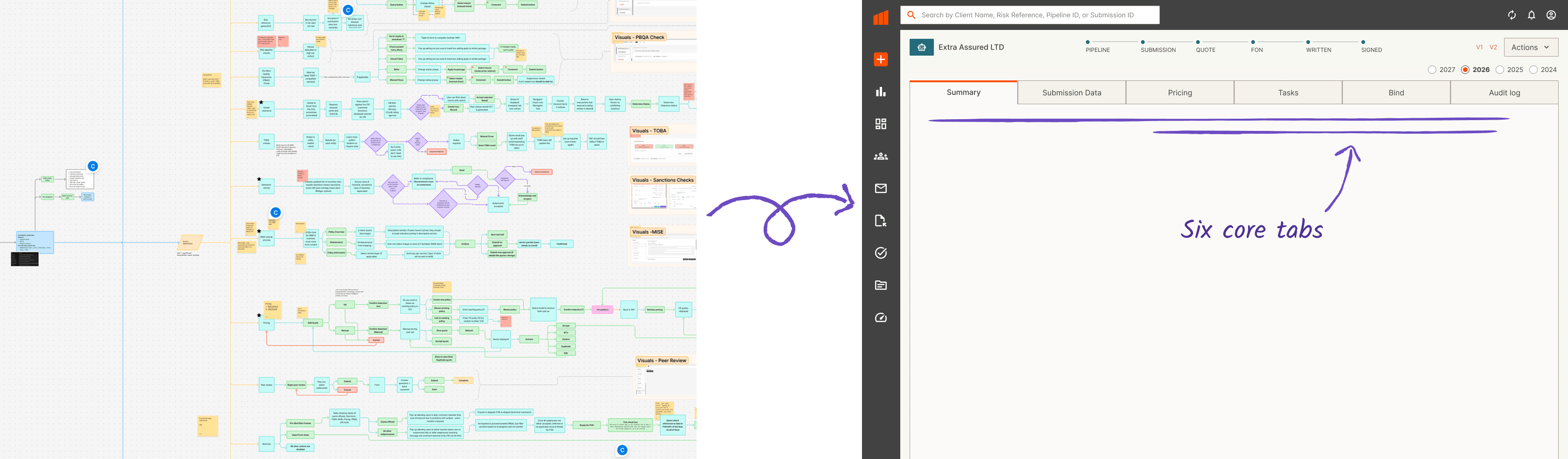
A large flow map showing the Policy Page redesign broken down into sections, tabs, actions and underwriting workflow states.

Workflow architecture

Breaking the Policy Page into manageable areas

The Policy Page was highly complex, so I broke the experience down into six core tabs relating to different data and process areas. This made the redesign easier to navigate for users and easier to tackle from a design perspective.

Workstream 2

Policy Page

Once a submission has been created, users are directed to the Policy Page. This page houses the submission details, relevant tasks and actions users need to complete to move business through different stages until it is bound.

It is one of the most critical parts of One Workflow, but also one of the most complex. Many different actions, states and scenarios are handled on a single page, and the previous experience relied heavily on reference-level data structures.

A policy can have one reference or multiple references. In the old design, data, tasks and actions were shown on a reference basis, which created duplication and made it harder for users to understand the policy as a whole. A major goal of the redesign was to shift towards a policy-level view.

Policy Page

Redesign approach

The Policy Page redesign was a large undertaking, so I broke the screen down into six core tabs relating to different data and process areas. This reduced scrolling, improved navigation and made the work easier to approach one section at a time.

As with Submission Creation, I gathered user feedback to understand the main pain points. The key goals were to reduce clicks and duplication, improve the intuitiveness of the process and make the interface more visually consistent using the Markel design system.

Due to the scale of the work and tight timelines, I hired a UX/UI contractor to support the Policy Page redesign. I managed the designer through the process, guiding design direction, reviewing work and making sure outputs remained aligned with the product vision and design system.

Policy Page pricing redesign showing policy-level quote information and pricing actions.

Pricing redesign

Designing pricing around policy-level visibility

Pricing was one of the most challenging areas because the redesign needed to support policy-level quote visibility while accounting for manual pricing in One Workflow and HX pricing through an integrated external platform.

Deep dive

Pricing complexity

The pricing portion of the Policy Page was particularly challenging. Users had strongly requested the ability to view quotes at a policy level, rather than only seeing partial reference-level quote information.

Designing this required careful thinking around multiple pricing scenarios, including manual pricing directly in One Workflow and HX pricing through a separate integrated platform. Each route introduced different states, actions and dependencies.

We worked closely with business analysts and the product owner throughout the redesign. Regular check-ins helped us understand the nuance behind the workflows, validate assumptions and keep the design realistic for development.

Leadership

Scaling the work

The Policy Page redesign became a substantial piece of work, both in complexity and delivery pressure. To keep momentum, I brought in a UX/UI contractor to support design exploration and production.

This gave me the opportunity to manage another designer through a live product redesign. I set direction, reviewed outputs, shared context, maintained consistency with the design system and ensured the work continued to meet user and business needs.

Outcome

Impact

  • Redesigned Submission Creation from a fragmented modal-based process into a clearer single-page input flow.
  • Released Submission Creation to users following development and UAT, receiving strong positive feedback.
  • Reduced clicks and improved speed for a workflow that sits at the start of the underwriting process.
  • Completed a major Policy Page redesign across six core tabs and multiple complex process areas.
  • Shifted Policy Page thinking from reference-level data towards a clearer policy-level structure.
  • Improved consistency by applying Markel design system components across major workflows.
  • Managed a UX/UI contractor through part of the Policy Page redesign, supporting delivery across a large and time-sensitive piece of work.
  • Policy Page designs are now moving into development as part of the ongoing One Workflow roadmap.

Learning

Reflection

This project reinforced how important it is to understand the mental models behind complex enterprise workflows. In underwriting, the structure of a submission or policy can be technically complex, but the interface still needs to help users understand where they are, what needs attention and what action they can take next.

It also showed the value of combining design system thinking with product redesign. The design system helped improve consistency and delivery speed, but the real impact came from applying those components to meaningful workflow improvements.

Managing a contractor through the Policy Page redesign was also a valuable leadership step. It pushed me to be clearer about design direction, context and standards while still making space for another designer to contribute meaningfully.